
C#m9/Dbm9 chord
Root position: The most common shape: the lowest note is the root named in the chord, with the other chord tones stacked above it.
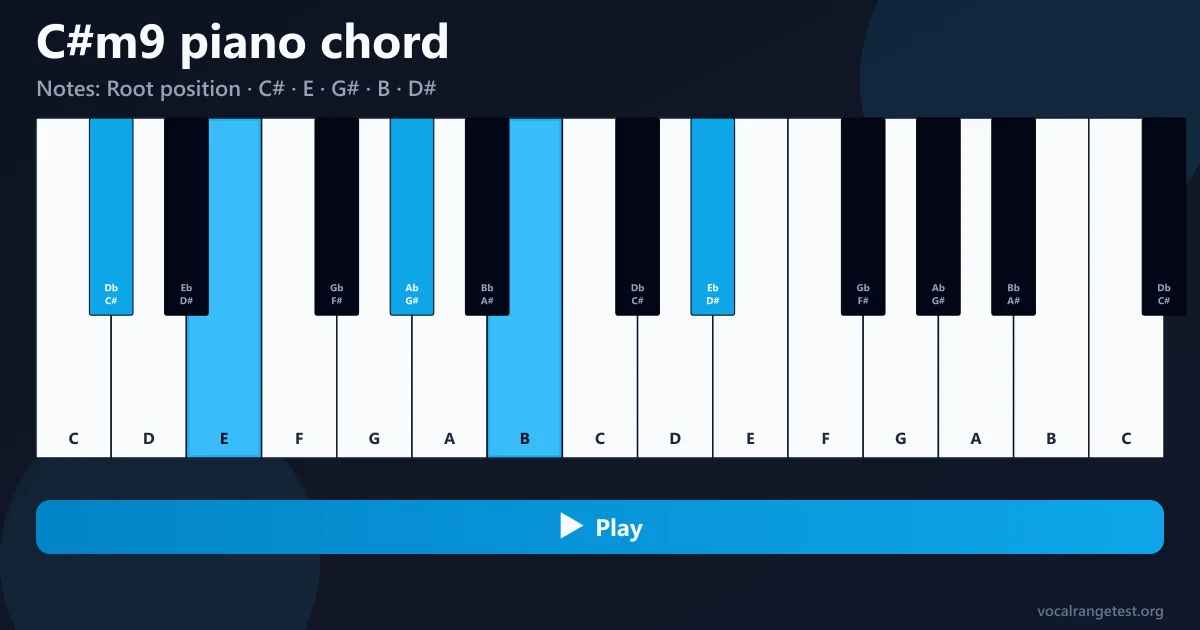
Notes: C# · E · G# · B · D#
Voicing: 1 / 4
Root
Chord type
Root position & inversions
Two-hand voicing
C#m9 (Dbm9) Piano Chord
If a chart says C#m9 or Dbm9 and you’re staring at the keys wondering where to start, you’re in the right place. This page is built around the C#m9 (Dbm9) piano chord as one sound on the keyboard: five notes, a clear shape, and a way to hear it before you commit your hands.
What people mean by C#m9 (Dbm9) chord on piano
C#m9 and Dbm9 are the same keys on a piano. One chart uses sharps (C#), another uses flats (Db). The black-and-white layout under your fingers does not change. What does change is how the chord is written in the sheet, so singers and players can stay consistent with the key signature of the song.
An m9 chord is a minor triad with two extras stacked on top: a minor seventh and a major ninth. For C#m9 that stack is C#, E, G#, B, and D#. Spell the same pitches as Dbm9 and you get Db, Fb, Ab, Cb, and Eb—awkward on paper, identical on the keys. The color is minor and a little “open” because of that ninth; it sits well in R&B, neo-soul, jazz ballads, and modern worship where a plain minor triad feels too thin.
Five notes, one color
Root, minor third, fifth, minor seventh, and ninth. Together they make the soft, slightly “floaty” minor-ninth sound people reach for when a basic minor chord feels unfinished.
Same keys, two spellings
C#m9 and Dbm9 share the same piano keys. Learn one shape and you can follow either spelling in a chart without relearning the chord.
Built to hear, not guess
Static pictures leave you guessing. Here you can play the full chord, single notes, and inversions so your ear catches the sound while your hands learn the shape.
Why this C#m9 (Dbm9) piano chord page is different
Most results stop at a still image. We built this tool so you can listen, take the chord apart, and try inversions in the browser—the gaps that usually send people bouncing between apps and YouTube tabs.

Hear the chord online
Hit play and listen to the full C#m9 (Dbm9) voicing on a piano sound. If a note feels wrong under your fingers, compare what you played with what you hear—no extra app required.
- Real piano playback for the full chord and single notes
- Clear note list for C#m9 / Dbm9 on the keyboard
- Inversions and two-hand voicings you can try instantly
How to play C#m9 (Dbm9) chord on piano

Listen once with clean ears
Play the full C#m9 on this page before you touch the keys. Notice the dark minor middle and the slightly brighter top from the ninth (D#). That mental target is easier to chase than a silent diagram.

Build it from the bottom
Find C# (the black key between C and D). Add E, then G#, then B, then D# above. If your chart says Dbm9, use the same keys and ignore the scary flat spellings for now—your hands only care about pitch.

Split hands when five notes feel crowded
A practical two-hand layout puts C# and G# in the left hand and B, D#, and E in the right. It frees the pinky, keeps the ninth audible, and leaves room to move if the next chord is close by.

Try an inversion when root position fights the melody
If the singer sits on C# already, a voicing with B in the bass (C#m9/B) can clear the top and add motion without changing the chord name on the chart. Use the inversion controls on this page, listen, then match what you heard.

Check yourself note by note
If the chord sounds thick or wrong, play each tone alone against the tool. Most “mystery wrong notes” are a missed black key or an accidental white key grabbed in a hurry—easy to fix once you hear the culprit.